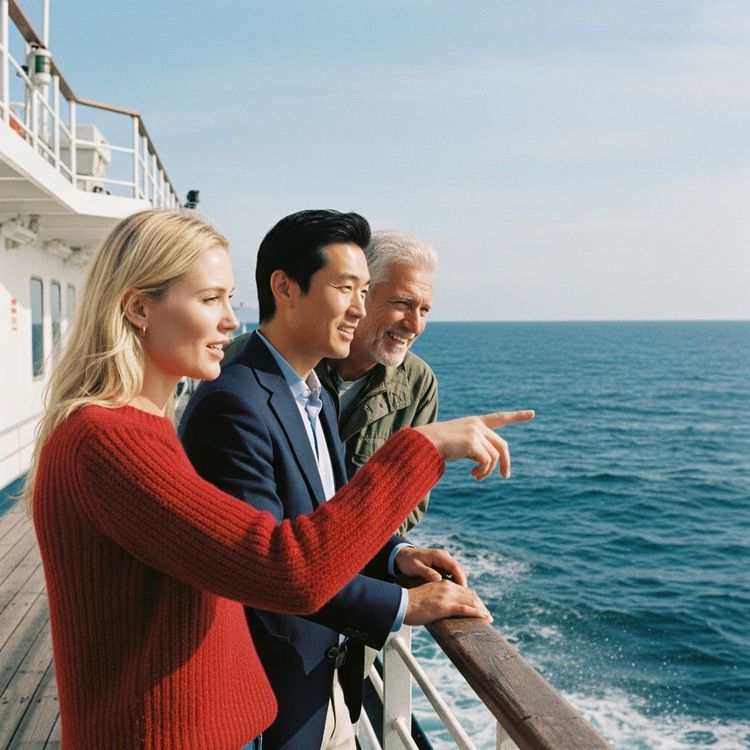
Editorial illustration for Google AI Model Mimics Smartphone Photo Sharpening Trick in Ferry Boat Image
Google AI Perfects Smartphone Photo Sharpening Techniques
Google AI model mimics smartphone sharpening in ferry boat image
Look closer at that ferry boat image. The overly sharp edges, the artificial pop, it’s the unmistakable fingerprint of a smartphone camera. Google’s AI has learned to mimic that look, and it’s doing so with unsettling precision.
But here’s the rub: the model isn’t drawing from Google Photos. Its inspiration comes from somewhere else entirely. Nano Banana Pro can now connect to Google Search, pulling real-time data to enrich its creations.
It adds context you never asked for, inserting details that feel instinctively right, like a shadow, a reflection, or that aggressive, phone-camera edge. The result is an image that looks less like a glossy render and more like something you snapped on a Tuesday morning. That’s the trick.
And it’s working.
In the AI-generated image of the ferry boat above, he noted the "aggressive image sharpening you encounter on smart phone photos. It's a visual trick that helps image 'pop.'" Another hallmark of photos taken with a phone? "Most AI generated photos feel far too clean.
The texture in these photos feel like they came from a tiny smart phone sensor." So where is Google's AI getting its notions about phone photos from? Google Photos would seem like an obvious -- and deeply problematic -- place to go, but Elijah Lawal, the global communications manager for the Gemini app, says that "for Nano Banana we don't use Google Photos." He also tells me that Nano Banana Pro hasn't been specifically steered toward producing a phone camera look. "One of the huge improvements is that it can connect to Google Search," he says.
If you prompt it to create an infographic about today's weather, it can go look up the temperature -- previously, you would need to include more of that information in your prompt. According to Lawal, this is limited to text search and not image search. But being able to go get real-world information on its own might be a key ingredient here.
Nano Banana Pro is especially good at adding things to images that make sense in that context -- even if you never specifically asked for them.
The ferry boat image is a mirror, not a map. It reflects the aesthetic fingerprints of a billion smartphone cameras, the overcooked sharpening, the sterile cleanliness, without ever having been trained on a single one of those photos. That’s the unsettling elegance of Google’s approach.
The model isn’t copying a dataset; it’s absorbing a cultural signal. It learns what a phone photo *looks like* by understanding what a phone photo *is for*: a moment, a memory, a quick thumb on the screen. The real trick isn’t that the AI can mimic a sensor.
It’s that the AI has learned to mimic the human instinct to make that image pop. And in doing so, it raises a quiet, urgent question. If the machine gets its sense of reality from the web’s noisy, compressed, hyper-optimized output, then whose photograph are we really looking at?
Related Reading
Browse all Google news → Open Source
 D&B rebuilds 642 million‑business database after AI agents hit limits
 Open Source
 Box CEO Aaron Levie Says AI Will Drive "Biggest Cybersecurity Upgrade
 Open Source
 Study: 6.7% of Deepfake Requests on Hugging Face Targeted Children
 Related Topic
 Google to End Free Access to Gemini AI for Non-Subscribers
LLMs & Generative AI
 Related Topic
 NVIDIA and Google Cloud let developers scale AI from prototype to production
Market Trends
 From Archives
 AI tool Suno lets producers generate full country tracks from a genre prompt
 From Archives
 Mixture-of-Experts AI Models Run 10× Faster on NVIDIA Blackwell NVL72
 From Archives
 Gemini 3 Pro tops trust, ethics, safety at 69% vs 16% for Gemini 2.5
Research & Benchmarks
 From Archives
 Amazon's Nova 2 Lite and Pro families undercut OpenAI, Google on price
AI Tools & Apps
Common Questions Answered
How does Google's AI model mimic smartphone photo sharpening techniques?
The AI model replicates the aggressive image sharpening algorithms commonly found in smartphone photography, creating images with a distinctive visual 'pop'. By understanding the subtle computational tricks that transform blurry shots into crisp memories, the model can generate photos that feel like they were taken with a mobile camera sensor.
What makes the AI-generated ferry boat image distinctive compared to traditional AI image generation?
The AI-generated image captures the textural qualities and visual characteristics typical of smartphone photos, including aggressive sharpening and a sense of being taken with a small sensor. Unlike previous AI-generated images that often appear too clean, this model introduces more nuanced and familiar photographic details.
Why is Google's approach to AI image generation considered a breakthrough in computational photography?
Google's AI model demonstrates a deeper understanding of how humans perceive digital images by mimicking the specific visual characteristics of smartphone photography. The model goes beyond simple image generation by capturing the almost imperceptible details that make mobile snapshots look professional and visually appealing.
Further Reading
- Google’s ‘Nano Banana’ Image Model Raises Questions About Over‑Sharpening Everyday Scenes — Anangsha Alammyan (independent tech writer)
- Gemini 2.5 Flash Image: Google’s Multimodal Model for Editing and Enhancing Photos — Campus Technology
- Imagen 4: Google DeepMind’s Sharper, Photorealistic Text‑to‑Image Model — Google DeepMind
- Image Generation with Gemini: Using Nano Banana and Gemini 3 Pro for Image Editing — Google AI Developer Documentation
- 5 Open‑Source Local AI Tools for Image Generation I Found Interesting — It’s FOSS
